All Posts in Early stage UX strategy

March 26, 2021 - No Comments!

Why an edTech Specialist Should Conduct Your Next Competitive Audit

You've likely asked your product team to conduct a competitive audit before kicking off the design process for a new product. But what if your internal team isn't the best fit for the job?

Working with a specialized UX design team to conduct a competitive audit will give you stronger recommendations for long-term solutions. Especially when those designers work in fields like edTech, where it's crucial to stay on top of advancements, product rollouts, and other industry updates.

Not only is an outside design firm more aware of your competitive field, they will also ensure that any improvements or adaptations you make on existing products are future-oriented.

Because when it comes down to it, your competitive audit should help you identify better design solutions than your competition. By leveraging better UX solutions that meet the needs of real edTech users, you'll become the edTech publisher to watch.

Find the Right Competitors to Track in the Field of edTech

If your internal product team already has a strong research and testing background, you might be hesitant to contract UXR services from another firm. But hiring a UXR team with an edTech background ultimately gives you an edge during the auditing process—and the resulting design strategy.

With tangible explanations and a heuristic score for each competitor, a UXR team that specializes in edTech puts usability standards at the forefront of their recommendations. But designing edTech tools takes more than a flair for visual design and good UX. It also takes a deep knowledge of the way users teach and learn with digital tools. 

A competitive audit conducted by edTech experts provides a rich snapshot of your product in the context of the industry. You'll immediately discover how your competitors are—or aren't—addressing your user's needs. For example, if you're designing an edTech product with a math-specific mission, your competitive audit should provide a framework for how competitors facilitate similar learning goals through UX solutions.

Because of their familiarity with the world of edTech, a specialized UXR team produces competitive audits that are deep dives into how users experience digital learning products. This extensive overview provides a strong foundation for your strategic decisions. Armed with the right information, you'll set yourself apart not just for your UX design—but for your understanding of the mechanics of teaching and learning.

Prioritize Features by Researching the Pain Points of edTech Competitors

Even popular edTech products have flaws and pain points. The more you learn about these design flaws during your competitive audit, the easier it will be to prioritize your own product's features. 

For example, users might dislike a competitor's search function because they struggle to filter relevant information. Even if your product doesn't include the same feature, knowing what your competitor does or doesn't do well helps you make strategy and design decisions. 

Competitive audits can also help your team refresh features during the product redesign process. If you're stumped about why your product isn't selling, auditing the field ensures that you're leveraging common UX solutions in edTech.

To avoid the same mistakes as your competitors, you'll likely need to conduct deeper user research into common areas of friction. When, where, and why do your users abandon their journeys?

Researchers specialized in edTech know how to conduct extensive user testing in the field to address these issues. They can also frame competitive audit findings in a way that directly supports your product and user journey goals. 

By the end of the competitive audit, you'll understand where users struggle within an experience and emerge with better, more nuanced solutions for improving the usability of your product.

Create a Shared Understanding of the edTech Industry with Product Stakeholders

The findings from your competitive audit are a powerful stakeholder alignment tool. 

Audits address user needs, challenges, and feature priorities—every element your team needs to make design decisions. Before your product team jumps into iteration, however, your competitive audit has provided internal stakeholders with a foundational reasoning for your team's design suggestions. 

With a shared understanding of the design challenge, your stakeholders will now more easily support the thinking and problem-solving of your design team. Ultimately, when audit findings drive strategic design decisions, there's less friction in every step of the process. 

From feature prioritization to rapid prototyping, use findings from your competitive audit to justify design decisions and help stakeholders remember what's at stake for your users.

If you're building an edTech product, don't settle for a competitive audit that looks at UX through a broad lens. 

A specialized approach to the auditing process gives you actionable solutions for addressing the needs of teachers and students through UX. You'll also uncover tactical solutions for solving persistent user pain points and educate your stakeholders on the most recent developments in the field.

Because edTech product design isn't just about creating an exceptional user experience. It's about creating digital learning tools that help teachers ease their administrative burden and ensure students engage deeply with content. Designed well, good UX makes a difference in real classrooms—and that's what matters most.

February 12, 2021 - No Comments!

Change Your Approach to edTech Product Design with Persona Resonance

No matter who your digital tool is for, that tool should reflect your user's environment. This includes the people your primary user comes into contact with, but who might never even know your product exists.

We like to call these people "resonant" personas. Unlike secondary or tertiary users, a resonant persona never uses your product or any of its output. But understanding this persona is crucial to unlocking the look and feel of your product for users.

When your primary user feels like your tool reflects their actual working environment, their entire experience changes for the better. Because this exercise is so effective, we think persona resonance deserves its own place in your investigation into primary and secondary personas and their needs. And we can show you how.

How Persona Resonance Affects edTech Product Design and Product Development

Let's consider two imaginary products. The first product is for a teacher who works with first graders. The second is designed for a high school teacher. Likely, you're already imagining two different approaches to visual design and UX, even without knowing anything else about what these products are supposed to do.

That's also persona resonance at work! Neither the first graders nor the high schoolers will use these products. Through UX and visual design, however, you can acknowledge that these resonant personas play a role in your users' ecosystems and in the world of each product.

Persona resonance can also guide strategic decision-making before you ever design a single screen. Take your competitive audit, for example. If you're designing a tool for a first grade teacher, you likely wouldn't include a product created for high school teachers in your competitive audit. The approach to both design and functionality would likely be too different to be useful.

When you understand the world around your user, it's easier to narrow your list of competitors and evaluate the most relevant details about their products. Persona resonance saves you time and helps you make stronger decisions—even early on in the discovery process.

By demonstrating how well you understand your primary persona, their needs, and their working environment, you and your team create a stronger product out of the gate.

Are you ready to try designing using persona resonance? Download our Persona Resonance Workshop below!

How Persona Resonance Affects Visual Design

Once you identify your resonant persona, it will impact the visual design and direction of your edTech product in subtle, powerful ways.

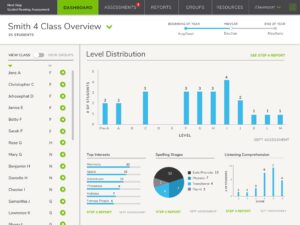
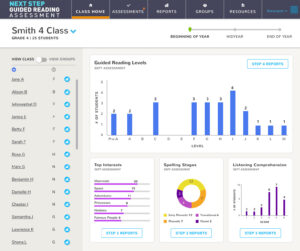
In 2019, Scholastic asked Backpack Interactive to design the Next Step Guided Reading Assessment. We created this complex reading assessment tool for teachers working in 2nd through 5th grades. Within the app, teachers manage a large amount of student data and must follow a robust series of notifications and recommendations in order to stay on top of their student assessments throughout the year.

As soon as teachers begin recording student data, the app provides a wealth of information about students' capabilities and challenge areas. Teachers are prompted to group students or draw on additional classroom management data to directly influence their teaching practices. The app also produces professional, beautiful, and individualized reports for parents.

Because of the tool's complexity, we worked hard to make its visual design soft and friendly rather than intimidating or institutional. In our first iteration, a neutral color palette, lots of white space, and a rounded typeface encouraged engagement and eased cognitive overload.

We achieved simplicity and clarity in our first design iteration, but we needed to bring in details about our resonant persona to make the NSGRA feel truly special. How could we use visual design to indicate that the product was intended for teachers of young students? Our design solution needed to bring in the rest of the user's world, to be inspired by the second-grade software and textbooks on our users' shelves.

Based on client feedback, we introduced a bright, punchy palette to the app's accent colors. Each section of the app is color-coded with this tropical palette, which represents the resonant persona. The choice of rounded typeface also nods to the resonant persona. It's not overly businesslike or formal, but the friendly typography is used in a sophisticated way.

These young students never see or use the product, which means they're not a secondary or even tertiary user. However, if the client developed student users in the future, we could easily build off of existing design decisions for a student interface.

By taking a hard-working interface and nodding to the fact that our users work with young students all day, we pulled the resonant persona into the teacher's world and the world of the app.

When you use persona resonance to inform the visual design of your edTech products, you help users feel more at home. Persona resonance signals to your users that you understand their day-to-day experiences in a way that encourages trust, engagement, and delight.

Are you ready to try designing using persona resonance? Download our Persona Resonance Workshop below!

January 28, 2021 - No Comments!

Three Ways to Leverage UXR Before You Build Your edTech Product

You know how important it is to get feedback on your product from your users during user testing. So why wait until after you've designed your product to get started?

Changing your approach to user testing and UXR can help you organize your edTech product strategy, avoid confirmation bias, and build an even stronger product. You'll likely save money in the long run, too.

Even if you've traditionally employed user testing once your product is built, it's not too late to adopt a new approach. Here are three ways you can weave user testing throughout the discovery and design process to build a better product.

Let edTech UX Research Guide Your Design Strategy

When it comes to designing edTech products, the best solutions are generated by getting to know actual users.  By adopting user testing earlier in the discovery and design process, you'll be able to identify the pain points, needs, and frustrations of the real people who will rely on your product to meet their goals. You'll also gain greater insight into your users' needs, instead of what you might assume their needs to be.

If you let it, UXR can guide your overall design strategy. The needs you address through design and feature prioritization will come from real people and detailed interviews. Maybe you've even watched as a student struggled to log in without help from an adult, or as a teacher strained to organize their data using your tool.

When you see users face challenges in real time, you're ultimately able to design a better experience. Instead of isolating an element of user testing to prove what you already believe, or ignoring user feedback that contradicts your original assumptions, you gather user data that makes a lasting impact on your product.

By developing a more nuanced understanding of your users and their challenges, you can guide strategic discussions with internal stakeholders more effectively. If stakeholders come to understand user challenges through the lens of specific interviewees, your company's users will become more real. This process will help your strategic conversations about product design become both more grounded and more productive.

Create More Accurate Personas Ahead of an edTech Product Redesign

If your goal is to redesign a particular feature, you'll want to know why something isn't working.

Test your current product with users in order to identify problems and produce better solutions. You may even want to interview users more broadly about the product by asking them to discuss the things they find frustrating or the ideas they have for improving a particular workflow.

As you observe users engaging with the product, you should be able to identify where a user flow breaks down. You may even discover that the problem you originally identified isn't the same challenge a user demonstrates during testing. All of this data gives you a helpful design benchmark before you ever begin the redesign process.

When you really stop to think about it, executing on real feedback from users doesn't take long—and you'll have built a stronger product in the end. It's a win-win.

Establish Feature Priorities for Your Next edTech Product

Thinking about how to prioritize the features for your next edTech product? The sooner you loop in your users, the better.

For example, if you want the perspective of an administrator or a teacher to guide your feature priorities, set up user interviews as early as you can. Interview 3 or 4 people from your target user group and identify the trends that emerge from those conversations. Even if the interviewees have different roles within your product, their perspectives can help you identify what users really need.

Bring your findings to discovery meetings, long before any real decisions are made about the product or its release. During discovery, you'll learn whether your findings align with the assumptions from other internal stakeholders. Compare and contrast! Which needs are the same? Which are different? Used in this way, UXR results can really facilitate collaboration and help you align with all the stakeholders in your company.

From prioritizing new features to redesigning old ones, UXR works best when it's woven throughout the strategic design process. Not only can you use the results to educate and inform internal stakeholders, but you can also use UXR to facilitate collaboration and accelerate strategic decision-making. In the end, you'll wind up with a better picture of who your users really are. You'll also design a product that truly solves for real challenges faced by teachers and students—a result that's well worth the investment in UXR.

September 29, 2020 - No Comments!

What’s Your Baseline? How to Make UXR More Valuable for Your Next edTech Product

UX designers in the edTech space are specialists who participate in a community of educators. To design well, they must have more than a working understanding of best practices in UI. edTech UX designers also need a background in learning science and user research. These specialties help UX designers accurately identify and design for the specific needs of the teachers, students, and parents who use their tools.

With a specialized background in UXR, edTech designers establish a baseline understanding of their users over time and quickly identify gaps in understanding during each new client project. These user baselines also allow designers to use the UXR phase more effectively, scaling research to fit a project and investigating tactical ways to quickly improve a product for its intended users.

This is especially true when designing for a specific subset of edTech users. edTech designers then start with a research baseline and use it as a framework to re-examine their assumptions. Foundational knowledge of user needs accelerates the development process in these cases and creates an even stronger framework for the user research you conduct.

Here's a quick breakdown of common research baselines you can use to ask better questions during the UXR phase of your next edTech product.

The Key to Designing edTech for Teachers

To meet the challenges of an edTech product for teachers, edTech designers must understand the foundational needs teachers have—their challenges and pain points—and be able to further narrow their focus to specific subject needs. They must also understand the entirety of a teacher's world, whether a teacher works with underserved populations or is gearing up for state assessments.

When you talk to real teachers throughout the UXR process, you're able to look beyond the needs of a fictional persona. Throughout surveys and interviews, you'll refine your understanding of how teachers navigate digital and offline tools. Once you know what a teacher's pain points are, you can prioritize them and establish their relationship to your business goals. You'll discover whether your tool will work in their classroom and likely make tactical changes to your product.

By working with edTech specialists throughout the UXR phase, you'll be one step ahead. edTech UX designers already know enough about the needs of teachers to work from a specific user baseline—even if we test those assumptions throughout the process. Here are the baseline assumptions about teacher pain points you need to know to design more effective UXR sessions:

Teachers conduct their work on mobile devices.

Understanding how and when teachers are likely to use edTech products on their phones is a must. Most likely, you'll need to simplify sequencing and processing for mobile design to make the product easier to use on the go.

For example, if you had a product centered around student assessments that could only be completed on a desktop, you might consider a professional development component to your product that worked well on mobile devices. We know that many teachers want to access this kind of content outside of their own classroom environment. Mobile-first professional learning content is a great baseline assumption to work from as you design your user experience research for a teacher persona.

Teachers are looking for more ways to address SEL growth.

Teachers recognize that technology plays a role in mitigating isolation during remote learning. edTech tools that help teachers reach students more effectively and build SEL skills will become ever more valuable. Research suggests teachers are more optimistic than ever about the ability of digital tools to facilitate one-on-one connections at times when those are not possible.

Teachers use edTech tools for instruction in one of three ways.

There are three different modes of instruction: whole group, small group, and individual instruction. We know these are consistent modes, especially for teachers of younger students.

Teachers with high school-age students tend to adopt individualized instruction modes when using edTech products. This is often because students have their own ChromeBooks issued by their school, which means teachers can depend less heavily on shared resources.

But individualization features do more than facilitate adaptive learning for individual students. They also aid adaptive learning in small groups. Work with teachers to discover how individualization features for your product will also affect full-class teaching.

Why Designing edTech Software for Students is Uniquely Complex

Designing edTech software for students is a much more complex task than solving for the common needs of educators. One complicating factor is age and grade level—the differences between K-2 are vast, and the jump between K-2 and 6th grade is even bigger.

Designing tools for students in higher ed is a different story altogether. All students are now adults and data and privacy concerns shift completely—just to name a few moving targets.

Even though designing for students comes with its own unique set of challenges based on age, grade level, task, and access to school technology, there are still a few baselines you can always work from when you're conducting UXR for your product. Here are three assumptions to work from:

Age affects independent learning with your edTech product.

The younger a student is, the more their teacher or parent needs to be involved in their interactions with your product. This will affect how you design everything from log-in screens to interactive features.

When you design edTech tools for older students, on the other hand, they're able to be more independent within your product and complete tasks on their own. It's also easier for a teacher to assign a group project to older students. Students and teachers alike may come to expect these types of instructional features from your tool.

Students expect consumer-like design patterns.

For most students, the context for interacting with edTech tools will be consumer products or games. These products have a high production value and plenty of digital media for kids to peruse. What are the patterns of consumer media that might apply to your product? Whether it's well-produced video instruction or complex game-play, the features in your edTech tool will be held up against the best consumer products on the market.

Students will use your edTech product at home.

Digital learning products always extend from the classroom to the home. Even during our pre-pandemic era, edTech products were regularly used in the home on shared computers or mobile devices. The better you understand a student user's home environment, the more successful your tool will be in the market.

For instance, if your product is designed to improve reading and literacy skills, you already know there's a good chance it will likely be viewed on a mobile device at home. You might even be able to assume that your student users will need more help figuring out next steps since they're out of the classroom and no longer receiving one-on-one instructional support from a teacher.

With these baseline user assumptions in place, you could instead focus your UXR efforts on finding the right balance between rigid sequencing and designing for students agency within your product. You'll want to ensure that your software directs student progress from the moment they log in without taking away elements of student independence, engagement, and discovery. It's a tough balancing act to get right—which means it's the perfect contender for your UXR efforts.

Designing Software for edTech's Fastest Growing User Base—Parents

Parent users have always had a facilitating role in edTech tools designed for younger students. When most students started remote learning last spring, parents took on even greater roles in learning technology. This is unlikely to change anytime soon. In fact, we think parents users are here to stay.

Here are a few of the baseline assumptions you need to make about edTech's next big user:

Parents are looking for easily digestible insights.

Parents with younger students have a co-working relationship with their children within a product. Parent users will facilitate, guide, and troubleshoot as their young children complete tasks.

As their children age, parents play less of a role in how students use a learning tool. Instead, they begin looking for insights into their child's performance. Parents of older children may want a dedicated portal that displays data on how their child uses a specific product.

What administrative data captured by your tool might be valuable to a parent user? Everything from how long a student session lasts to engagement or achievement rates helps parents get more involved in their child's education.

Parents want to weigh in.

Now that parents are more involved in remote learning with digital tools, they're looking for more ways to interact with their child's teacher and provide feedback on tools. They're become more savvy than ever about everything from ease-of-use to integration. The more opportunities you provide that open the channels of communication between parents and teachers, the more valuable your edTech tool will be.

As you can see, the assumptions you begin with when designing edTech products shape the kind of user research you conduct. With the right research and evidence base, you can build off of user assumptions and conduct ever more meaningful UXR sessions.

UXR is always valuable—but it's even more valuable when you can work off baseline assumptions and truly scale UXR to the most unique aspects of your product.