All Posts in

April 1, 2021 - No Comments!

How a Year of Digital Learning Will Shape EdTech in 2021

Over the last year, we've all identified new edTech features that will help our users teach and learn more effectively from home. Maybe you've incorporated SEL frameworks into your UX and learning content. Or maybe your product team went all in to design collaborative features for better peer-to-peer learning. Now, after extensive reimagining of your digital learning tools, it's time to tackle a new season in edTech. 

Gone are the days when teachers use edTech products just to facilitate homework collection or collect form responses. After a year of remote learning, teachers have extensive, daily practice using powerful online tools. They now feel confident in edTech's ability to deliver an excellent digital learning experience to their students—not just a supplementary one. 

Combined with new perspectives on school day routines, teacher confidence in technology has resulted in greater flexibility. Educators see value in using edTech to facilitate eLearning in different ways, for different student learning styles, and at different times throughout the school day and school year. This represents a huge mindset shift in educators' approach to edTech, and it will determine work in our sector for years to come. 

As you incorporate lessons from the pandemic into your edTech product roll-outs this fall, here's what you can expect to encounter in a new and shifting educational landscape.

Teachers Will Use edTech to Facilitate More Meaningful Learning Experiences

Now that educators have spent the last year translating much of their work to a digital space, they're confident users of edTech products. 

Teachers know how to find and integrate robust digital learning experiences into existing teaching routines. They're no longer looking for edTech products or learning content to simply supplement a classroom lesson. 

Instead, new tools with high-quality content help teachers facilitate the act of learning itself. This might look like assigning students short digital texts for research, asking students to play a learning game, or requiring students to complete an interactive quizlet. 

Features that facilitate student collaboration and project-based activities also help create meaningful digital learning experiences. When students are able to work together to solve problems or set learning goals, they stay more engaged with content, take agency over their own learning, and develop stronger SEL skills.

Finally, step-by-step learning systems are powerful tools for personalizing and adapting content to individual student needs. When edTech tools break down foundational concepts into steps that are easy to master and build on, students have richer online learning experiences within digital products. 

By keeping these newly experienced, confident consumers in mind, you'll design the high-quality edTech tools that appeal most to teachers, build trust with your users, and demonstrate the value of edTech in 2021.

Teachers Will Use edTech Data as a Daily Teaching Touchpoint

As teaching moved online last year, teachers have collected more data about their students than ever before. These records will become even more valuable to teaching practice in the fall, when edTech tools are integrated into daily classroom practice.

With the right data collection tools, teachers can track and review past student performance, plan lessons, and address individual student needs even more effectively. When teachers can see where students have been, where they need to go, and how to be flexible in that path, education becomes more focused and personalized. Ultimately, well-designed edTech tools have the power to help teachers teach students—not just the curriculum.

edTech is also capable of providing powerful, just-in-time support for teachers. For example, your teacher-facing product might suggest formative assessments at specific points throughout the year. It might even train educators on best practices for integrating assessment techniques into their lesson plans. With assessment and professional learning features, your teacher-facing products can become robust tools for new educators.

At its best, edTech gives teachers time back in their day to reflect on student performance, design targeted interventions, and continue their professional development. And when teachers have more time in their day, they can use it to fuel the most important part of their job—reaching students.

edTech Products Will Foster Student Accountability and Professional Growth for Educators

The transition to digital spaces has created more transparency around teaching. Suddenly, parents are "in" their child's classroom every day—even if it's only on the other end of a Zoom screen. These parents can see how a teacher prepares and delivers a lesson and better understand the work their child is responsible for. 

Thanks to product logs and other records, it's easier than ever to break down the interactions in student collaborations or student-teacher interactions, like homework turn-in, student participation, and software interactions. These records make teachers and students even more accountable for their interactions and provide greater opportunities for learning and growth. 

Student and teacher interaction data can fuel stronger professional learning and development experiences for educators. Empowered by real data, professional coaches will have the ability to elevate exemplary teaching practices that make a difference in both remote and hybrid classrooms. 

edTech products with powerful data capabilities will continue to shape relationships between teachers, students, and parents in Fall 2021 and beyond.

Using edTech to Extend Learning Outside of the School Day and Close the Achievement Gap

We're excited about these big shifts in the relationship between users and edTech. But we also anticipate that edTech users will want to address a widening learning and achievement gap exacerbated by the pandemic. 

From individual schools to state-wide policies, we expect that educators, administrators, and parents will push students to "catch up" on everything they've missed. Because of its singular ability to scale, edTech should be a key part of bridging this achievement gap over the next year. 

Asynchronous tools with rich learning content can even help students maintain momentum around learning after the school year is over. This will lessen the effects of "summer slide" in a year where few struggling students can afford to slip further behind. 

With high-quality digital tools, students can access robust virtual learning experiences outside of the regular school day that will help them stay on track. 

Teachers can use those same tools to meet individual needs and facilitate meaningful learning experiences throughout the school day and school year.

We spent the last year making our edTech products remote-learning ready, and now we face new, exciting challenges for Fall 2021. Our users have new expectations, and require ever-more flexibility. It's time to meet these challenges head-on!

Are you thinking about your Fall 2021 edTech product roll-out? Get in touch and tell us more about your needs. 

March 10, 2021 - No Comments!

Discover Innovative Solutions for Your edTech Product With Rapid Prototyping

If you've embraced agile product development, your product team likely builds products with the design skills and tool sets they already know will be successful. Even if you're planning sprints and embracing iterative design, you'll always be headed toward your product team's MVP solution.

While this can be an efficient way to design and produce products, it leaves little room for innovation. In fact, agile product development often lacks the elements of discovery, search, or trial and error that lead to breakthroughs.

Product teams that rely heavily on agile processes are likely missing out on better or more innovative solutions to their creative problems—simply because they're not given the time or resources to go looking for them.

By developing prototypes and producing demonstrations quickly, your team will think more strategically about product requirements, push your product in exciting directions, and bring internal stakeholders along for the ride.

Balance Agile Development with Rapid Prototyping for Better edTech Tools

Even when used within agile development frameworks, rapid prototyping provides teams with more creative leeway to find unexpected solutions to complex problems.

Both your UX and development teams may need to use unfamiliar technology or learn new skills quickly to develop a prototype on a tight turnaround. We know this isn't always possible when your project has a strict deadline or budget ceiling. But the trade-offs are almost always positive.

Not only will your team stay more up-to-date on current design trends, but they'll also learn new skills destined to keep your next edTech product ahead of the curve.

Ultimately, when you're able to build in more time for learning and problem-solving, you're guaranteed to head into product development with the most innovative and creative solutions your team can muster.

You might even create a future-proof edTech product—and leapfrog over your competition.

Rapid Prototyping Allows for Strategic and Creative Risks

Because the stakes for a prototype are so much lower than the stakes for your finished product, prototypes give your team the opportunity to break free of traditional design solutions.

Whether you're creating a rostering tool or an assessment feature, your design team's sense of the "traditional" solution begins as early as the discovery phase. Your team looks for competitors that represent the most popular brands in your product space. Who's up-and-coming? Who's doing something new?

But keeping up with the competition can sometimes mean treading the same ground as brands that are already successful in your market. Get out of your design rut by actively pulling apart user pain points and considering how to create the best user experience.

When you consider the best way to solve problems independent of user expectations and competitor data, you broaden your pool of solutions—and often hit on something innovative. Rapid prototypes allow your team to test out these innovative design solutions and ensure your new ideas are viable.

You may even be inspired to look to other industries, mediums, and digital product spaces in order to pull new ideas into your toolkit, identify new technology opportunities, and seek out inspiring tone and voice examples. Which brands are being enviably playful, innovative, or disruptive?

It's important to understand where your competitors are coming from, but you should always look for opportunities to flip the conversation on its head. Rapid prototyping will help you identify and test these innovative solutions even faster and with more strategic clarity, so you can stand out from the crowd—and build a product that stands up to the test of time.

Prototype Demonstrations Align Stakeholders Quickly

Unlike design presentations, prototype demonstrations are tactical. They show how the product works in real time, which means your stakeholders no longer have to imagine how your product works in an abstract way.

Clickable wireframes, rapid prototypes, and rough animation are all helpful tools for gathering constructive feedback from your CEO, sales team, and other internal stakeholders with little-to-no context. There's no need to review specific use cases or persona documentation or be brought up to speed by the product owner. Instead, your stakeholders can simply react to a design or technology idea as it's executed in real time.

Because rapidly built prototypes are real, stakeholders stay engaged in the product's success throughout the design and development process. When your company is energized around a product, everything moves faster and falls into place more easily, including budgets and internal support.

Getting the right input from the right stakeholders at the right time makes all the difference to your product team, too. If nothing else, your own team will be excited and creatively challenged as you charge ahead.

Catch the Holes in Your edTech Design Strategy

Even if your product owner, development team, and UX team have all looked at product wireframes a million times over, creating clickable prototypes will help you discover the holes in your own planning and edTech design strategy.

A clickable prototype reflects the complexity of your product. Using prototypes to fuel design, strategy, and feedback sessions will help you identify where team members have different assumptions. With a working prototype in front of you, you'll identify important edge cases or find the gaps between technology and design thinking that you may have missed.

A word of caution. Focusing too intently on your prototype's functionality can actually backfire. Prototypes exist somewhere between a quick, lightweight build and full product design. If the prototype process takes too long or becomes too involved, you could wind up uncovering problems that would never exist in the real product.

Stay on track by keeping your prototype build light and fast. Anything that takes longer than a week to finish probably isn't as "rapid" as it should be!

The Resources You Need to Embrace Rapid Prototyping

Quick turn-around user research and testing abilities
If you start the product design process with a developed testing plan, you can use it to propel your team through UX and technology plans, too. Set up parameters for testing, research, and feedback generation to get the most out of rapid prototyping to solve real user problems.

A devoted front-end developer
With a skilled front-end developer on your team, you can quickly create proofs of concept that help move both UX and UI forward with technology solutions.

Time
While rapid prototyping should take less than a week, building enough time into your entire project to allow for creative thinking is crucial. Where can you extend your timeline to allow for more creative solutions?

Design thinking 
Use design thinking to break down problems and foster the most creative solutions from both visual designers and developers.

Software
Many programs offer prototyping tools to help your designs come to life. Here are a few we recommend:

Rapid Prototyping Builds a Design-Forward Company Culture

Successful design cultures are built by teams that think innovatively about design and user research outside of client and product deliverables. While rapid prototyping is most often used to move specific projects forward, the skills your designers and developers need to be good at prototyping start within your company's culture.

Help your team develop an innovative mindset as they explore real problems in learning and education. Which new technologies and design methods can solve for the most pressing problems faced by educators and students?

When your entire team is immersed in the vertical, they'll be able to imagine how to apply design and technology solutions in edTech, test solutions through prototypes, and take your product design into the future.

February 24, 2021 - No Comments!

Team Spotlight: Monica Sherwood

Welcome to our Team Member Spotlight! Every month we interview a member of our team and highlight their unique contributions to Backpack. We're a close-knit, interdisciplinary team, and we love to share how our experiences inform everything from UX research to visual design. Learn all about our approach to UX—not to mention staff secrets, hidden talents, and the things we can't live without.

Monica Sherwood, UX Research Lead

Photo of Monica

What was your 1st grade teacher's name and what was your favorite thing about them?

My first grade teacher was Ms. Danca. She was kind, fun, and inspired me to become a teacher. 

What is your essential work-from-home comfort item at the moment?

My cozy Backpack Interactive blanket of course! And my French press. 

What has been your favorite moment working with Backpack so far?

Forming the Backpack Teacher Council! As a former teacher, it’s been great to create connections with current educators and continually gain insights into their experiences with digital products. 

What are you working on outside of work?

Writing! My debut novel for middle graders, The Ice House, is coming out in Fall 2021! And practicing the ukulele. 

You write a lot about UX research for our insights blog, so what is one thing you wish product owners understood about UXR?

UXR allows teams to align their priorities, check their assumptions, and learn actionable information about what matters most to users. UXR can help empower product owners to make difficult decisions around prioritization and features, and justify those decisions to stakeholders. 

Follow Monica: 

Twitter
Goodreads

February 12, 2021 - No Comments!

Change Your Approach to edTech Product Design with Persona Resonance

No matter who your digital tool is for, that tool should reflect your user's environment. This includes the people your primary user comes into contact with, but who might never even know your product exists.

We like to call these people "resonant" personas. Unlike secondary or tertiary users, a resonant persona never uses your product or any of its output. But understanding this persona is crucial to unlocking the look and feel of your product for users.

When your primary user feels like your tool reflects their actual working environment, their entire experience changes for the better. Because this exercise is so effective, we think persona resonance deserves its own place in your investigation into primary and secondary personas and their needs. And we can show you how.

How Persona Resonance Affects edTech Product Design and Product Development

Let's consider two imaginary products. The first product is for a teacher who works with first graders. The second is designed for a high school teacher. Likely, you're already imagining two different approaches to visual design and UX, even without knowing anything else about what these products are supposed to do.

That's also persona resonance at work! Neither the first graders nor the high schoolers will use these products. Through UX and visual design, however, you can acknowledge that these resonant personas play a role in your users' ecosystems and in the world of each product.

Persona resonance can also guide strategic decision-making before you ever design a single screen. Take your competitive audit, for example. If you're designing a tool for a first grade teacher, you likely wouldn't include a product created for high school teachers in your competitive audit. The approach to both design and functionality would likely be too different to be useful.

When you understand the world around your user, it's easier to narrow your list of competitors and evaluate the most relevant details about their products. Persona resonance saves you time and helps you make stronger decisions—even early on in the discovery process.

By demonstrating how well you understand your primary persona, their needs, and their working environment, you and your team create a stronger product out of the gate.

Are you ready to try designing using persona resonance? Download our Persona Resonance Workshop below!

How Persona Resonance Affects Visual Design

Once you identify your resonant persona, it will impact the visual design and direction of your edTech product in subtle, powerful ways.

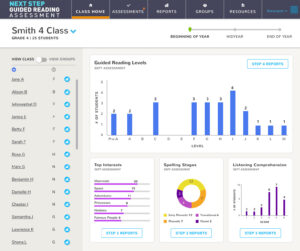
In 2019, Scholastic asked Backpack Interactive to design the Next Step Guided Reading Assessment. We created this complex reading assessment tool for teachers working in 2nd through 5th grades. Within the app, teachers manage a large amount of student data and must follow a robust series of notifications and recommendations in order to stay on top of their student assessments throughout the year.

As soon as teachers begin recording student data, the app provides a wealth of information about students' capabilities and challenge areas. Teachers are prompted to group students or draw on additional classroom management data to directly influence their teaching practices. The app also produces professional, beautiful, and individualized reports for parents.

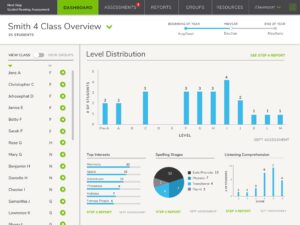
Because of the tool's complexity, we worked hard to make its visual design soft and friendly rather than intimidating or institutional. In our first iteration, a neutral color palette, lots of white space, and a rounded typeface encouraged engagement and eased cognitive overload.

We achieved simplicity and clarity in our first design iteration, but we needed to bring in details about our resonant persona to make the NSGRA feel truly special. How could we use visual design to indicate that the product was intended for teachers of young students? Our design solution needed to bring in the rest of the user's world, to be inspired by the second-grade software and textbooks on our users' shelves.

Based on client feedback, we introduced a bright, punchy palette to the app's accent colors. Each section of the app is color-coded with this tropical palette, which represents the resonant persona. The choice of rounded typeface also nods to the resonant persona. It's not overly businesslike or formal, but the friendly typography is used in a sophisticated way.

These young students never see or use the product, which means they're not a secondary or even tertiary user. However, if the client developed student users in the future, we could easily build off of existing design decisions for a student interface.

By taking a hard-working interface and nodding to the fact that our users work with young students all day, we pulled the resonant persona into the teacher's world and the world of the app.

When you use persona resonance to inform the visual design of your edTech products, you help users feel more at home. Persona resonance signals to your users that you understand their day-to-day experiences in a way that encourages trust, engagement, and delight.

Are you ready to try designing using persona resonance? Download our Persona Resonance Workshop below!