You're ready to develop a new digital learning tool, and you've pulled inspiration for your product vision from consumer platforms and edTech alike. But will your feature ideas really support the needs of edTech users?
User surveys can help you uncover some answers, but competitive audits, or competitor analysis, provide an even fuller picture of the edTech marketplace. A competitive audit offers feature-by-feature comparisons of related products, as well as strategic suggestions for improving your own features throughout the design process.
By identifying specific user challenges with competitors' products, you can refine your strategic priorities, avoid common pain points, and ensure that your new product will be better than what's already on the market.
Done well, competitive analysis also puts edTech users back at the center of product design. After all, when you hire a UX firm that specializes in edTech, you work with designers who can translate good UX practices into good UI design for teachers and learners.
Here's how Backpack Interactive uses competitive audits to give clients unique insight into edTech personas and help them develop must-have product features.
Analyze Your edTech Personas and User Groups
From a strategic standpoint, competitive audits provide complimentary support for persona development. With targeted analysis, this deliverable has the power to inform strategic design decisions from start to finish. Armed with stronger information about your competitors and users, you'll build a product that meets the needs of the teachers and learners you support.
During Backpack's competitive audit process, we focus on products that address the needs of users similar to your product's target audience. We dive deep on your user groups to guide the audit process, including secondary or tertiary users that are often forgotten.
Consider your most recent product with a teacher-facing dashboard. It likely has many options for reporting to school administrators or parents. That feature alone has directly shaped your product personas and user groups—even if these users emerged late in the design process. That's right—even if admins and parents don't use your product, they're still an important user group to consider from the get-go.
When we identify these user groups during a competitive audit, you and your stakeholders develop an even more nuanced understanding of user needs. This analytical process directly supports product design by making it easier to strategically align your stakeholders on the best user-centered design decisions for your product.
Examine Common UX Patterns through an edTech Lens
edTech products are inherently different from digital tools designed for consumers because schools and learning materials produce unique user dynamics. Common features are dictated by the way teachers interact with students, or how learners master new concepts. For these reasons, relying solely on visual design or appeal to guide strategic decision making in edTech is often a fatal mistake.
Even if an idea looks good on paper, it won't necessarily address the needs or use cases of students, teachers, and administrators. It's important for every stakeholder involved in your project to understand why a UX pattern in consumer tech—like a Spotify library, for example—might not work in the context of a learning environment. Even if there's initial excitement around a common UX pattern in the consumer world, competitive audits are a great tool for ensuring alignment on the best UX patterns for your edTech product.
During Backpack's competitive audit process, we only consider how digital products are used in the context of learning environments. Even if we analyze products that support learners outside of traditional classroom settings, we prioritize the UX of teaching and learning above other interactions. After all, your products must work for edTech users within learning environments in order to be adopted and widely used.
So don't just conduct a competitive audit and put it back on the shelf. Refer to your competitor analysis and recommendations throughout the design process. This will help your stakeholders align on user needs and feature priorities, so you can make a real impact on the teachers and learners who use your tools.
How to Evaluate the UX of Common edTech Features
By examining UX patterns common to edTech products, a competitive audit highlights specific user needs, provides more context about users' learning environments, and helps you avoid costly design decisions.
From dashboards to rostering features, here are the three edTech-specific features we analyze again and again. Finding the right UX solutions for these features will inform everything from your user journey to design direction. Let's dive in.
Student- and Teacher-Facing Dashboards
One of the biggest decisions you make as a product owner is how you'll differentiate the UX and visual design of your student- and teacher-facing dashboards. Is student content accessible to students who can't yet read? Is teacher content easy to export into a professional report, so they can share findings with parents and administrators?
In order to gain a competitive edge, examine how comparable brands and products address the needs of their student and teacher users. Which UX choices help their users navigate and understand relevant data? How do their visual design choices reflect an understanding of a student's grade level or a teacher's day-to-day environment?
The more you distinguish the user experience of student- and teacher-facing dashboards with both UX and visual design decisions, the easier it will be for users to engage with your learning content and advocate for adoption.
Login Patterns
No matter what kind of edTech product you're building, examining login patterns during the competitive audit accelerates critical decision-making. Should students have a unique login or use a QR code for more accessibility? What about SSO integration? How will teachers manage or administer this process?
It's important to get these decisions right. As remote learning has shown us, a frictionless login experience is crucial to the adoption and engagement of your product. Especially in edTech, users interact with your product long before they ever reach a login screen.
Consider a student-facing product administered by a teacher, like Class Dojo. Teachers send QR codes for student logins to family members, so students can log in on their own. With other products, family members might facilitate the login for their child.
If the login process becomes too complicated at any of these touch points, you'll lose users along the way—and make it almost impossible for teachers to truly integrate your product into their toolkit.
Rostering Features
User management is a challenge in any industry. In the education sector, however, concerns about privacy, data sharing, and permissions are especially high.
A competitive audit that examines rostering and other user management features will help you stay ahead of the curve. This area of product design changes quickly, and without a thorough competitive audit, you might roll out a time-consuming, expensive build that fails to meet the up-to-date user expectations.
Product integration with tools like Google Classroom should also stay top of mind during your research. Can teachers automatically add students to their class? Must they do so manually, or can they upload students in large batches? Who manages the process and how flexible are these permissions?
Every school system has a different approach to user management and permissions, and competitive audits provide strategic pathways for working through these issues. By making your products more customizable, you'll anticipate shifting user needs and "future-proof" user management features.
From individual user permissions to product integrations, customization and flexibility makes your product easier for teachers and administrators to both use and adopt.
How Competitive Analysis Identified a Crucial Market Gap for Heinemann Publishing's Listening to Learn Platform
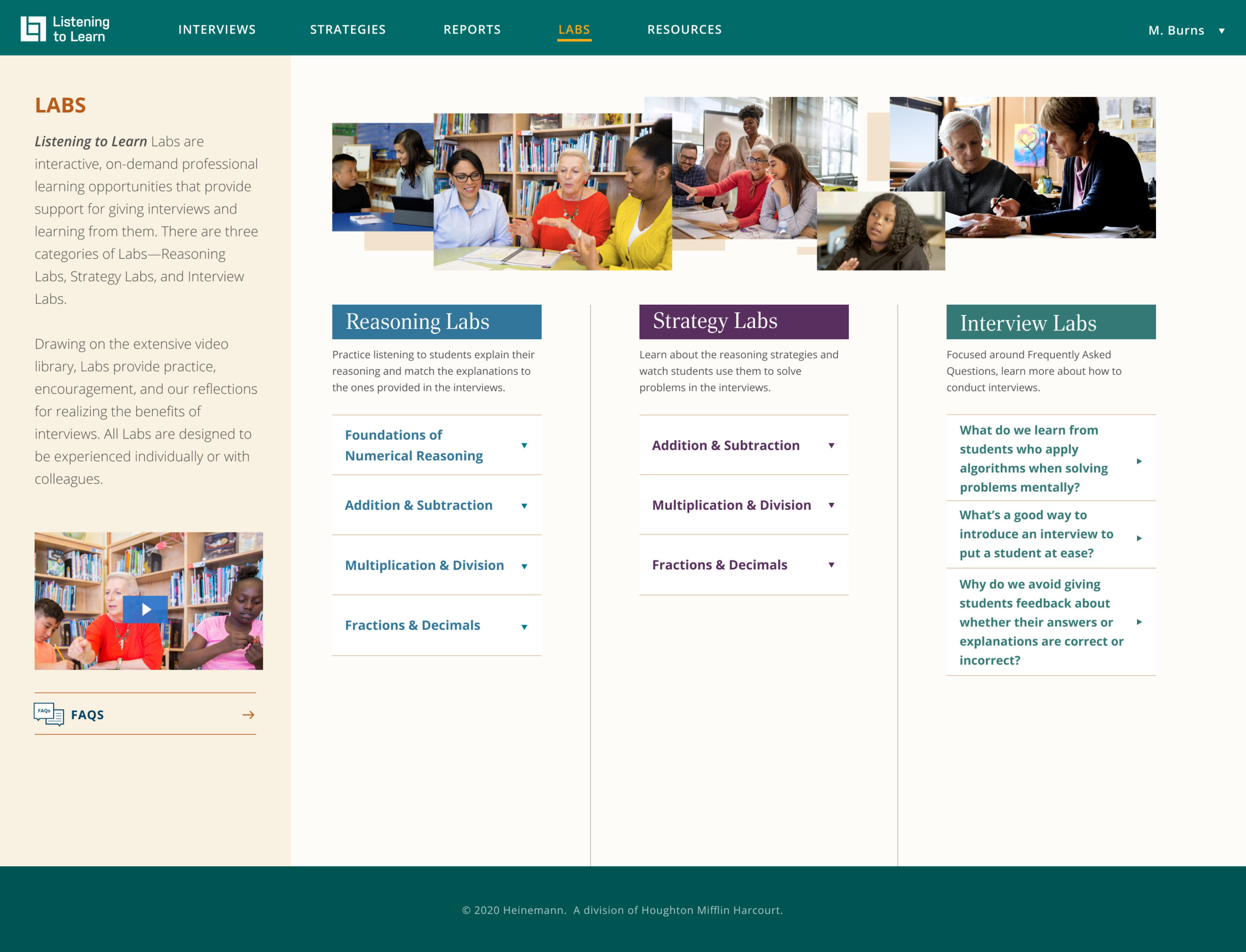
Listening to Learn Labs provides interactive video support for teachers wishing to practice assessment interview techniques.
When Heinemann Publishing decided to launch a new platform dedicated to helping math teachers improve their assessment techniques, they hired Backpack Interactive to help them better understand the competitive market. The publisher's vision for its new platform, Listening to Learn, was to introduce an entirely new way for teachers to learn more about math instruction.
We immediately wanted to know more. How had competitors provided professional development within assessment tools in the past? Was there currently an existing product that tied professional development and student assessment software into a single, teacher-facing product? How would such a product be received? And what types of support and training would teachers need to use such a product effectively?
Before diving into competitive market analysis, Backpack Interactive went back to basics. We conducted an extensive user survey with existing Heinneman customers. Our goal was to understand the challenges these customers experienced while conducting math assessments. We also identified other major players in the field, established more detailed use cases for the assessment tool, and measured customer satisfaction with a related legacy product from the same author.
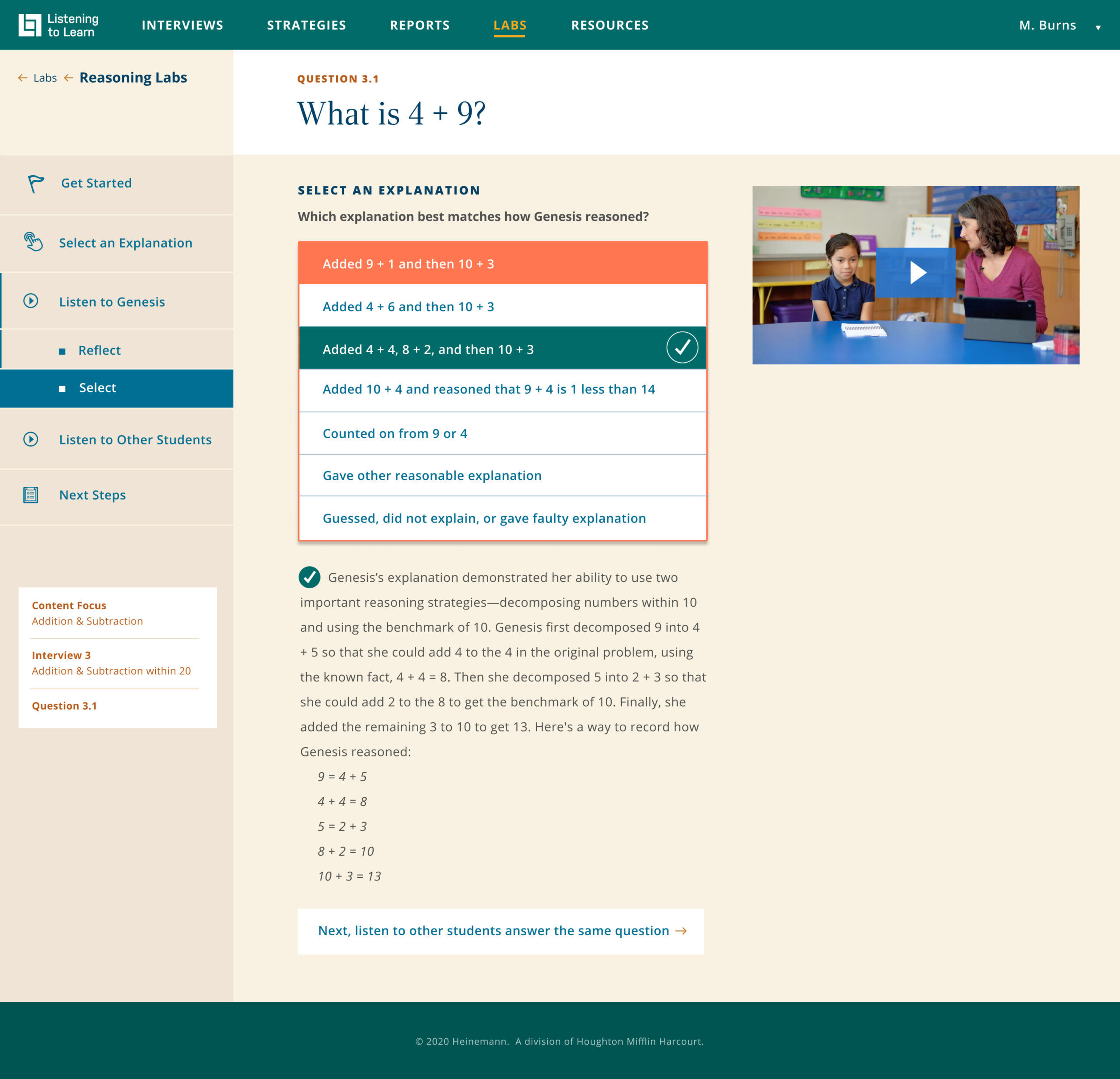
After watching a video of a student, instructors determine how the student reasoned out a math problem. Every response is supported with subject matter expertise.
But something exciting and unexpected stuck out in user survey responses. Many educators indicated that they hadn't received regular professional development on assessment best practices. At most, they attended an annual training. Even if teachers received training in assessment data analysis, they indicated a need for more regular support. Ideally, they would be able to access this support as challenges arose with conducting an assessment or analyzing the results.
Identifying this critical market gap directly impacted the design strategy for product updates in Listening to Learn. Armed with a competitive analysis, we considered how best to support teachers in their professional learning around assessments.
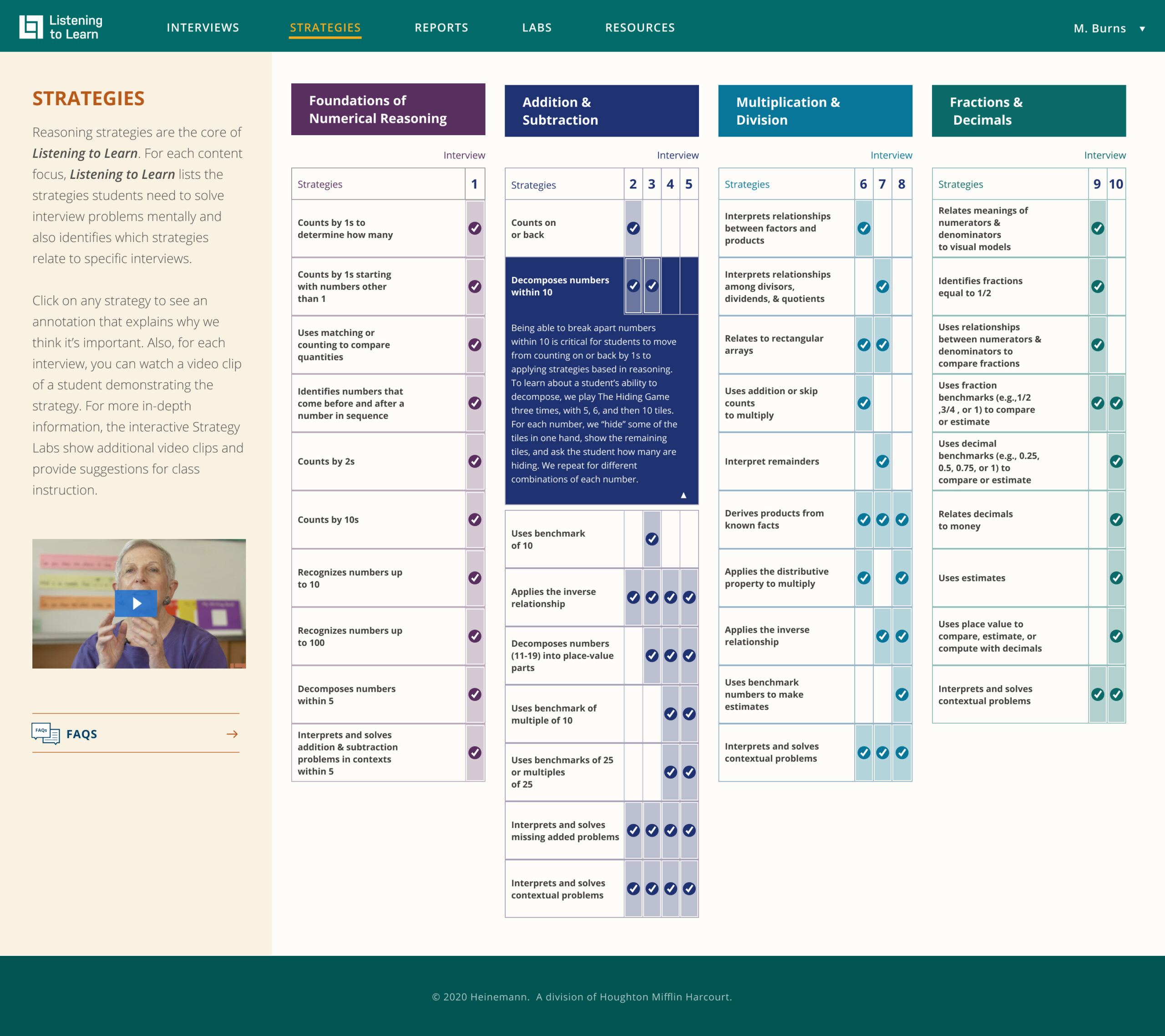
In addition to interview support, Listening to Learn provides annotated guidance on student reasoning and problem-solving strategies. These annotations help instructors identify the strategies students use to solve math problems.
We knew that professional development content had to be easy to locate within the product. It would be even better if we were able to integrate subject matter expertise into the structure of the product itself. By making professional learning content more accessible, we were also able to design a product that supported teachers of all ages and technical abilities.
In early ideation conversations, we referred to this analysis regularly to ensure stakeholder buy-in and guide strategic decision-making. We worked with the Heinemann team to develop rich, self-paced, interactive product features that helped teachers engage deeply with professional learning and support. Ultimately, competitive analysis and the resulting recommendations helped Heinemann's stakeholders align around feature priorities, user interactions, and product navigation to create a digital tool that innovatively addresses a real user need.
Whether you're rolling out product updates or designing a digital tool from scratch, competitive audits conducted by an edTech UX specialist give you an edge. Together with your UX team, you can use audit findings to refine your personas, examine features specific to edTech, and align your stakeholders. After all, the better you understand which features teachers and students need to succeed in the classroom, the faster your product will be adopted by teachers and administrators alike.
Are you ready to see what your competition is up to? Contact us about our research services, or to begin the discovery process today.




 What was your first grade teacher's name?